Docs are UX Too
- published
- reading time
- 13 minutes
1. Programmer Art
I’m a back-end developer. If you have come to a stream you will either already know this, or be surprised by this. If the latter you probably just think I’m a really bad developer. I have spent most of my time making things that take command line arguments or stdin inputs. Some of the things I have worked on have a web UI, but it was someone else’s job to build it, I just give them a nice REST API to call.
Despite that, I’ve been working on UI’s for my own projects lately, because there’s nobody else to do it. I’m pretty sure the results of this work could be charitably called “programmer art”. It’s something I should probably work on, but I’m not exactly sure where to start. On the one extreme is the sort of UI I am capable of creating. It might not be the prettiest, but it will get the job done. I hope. On the other extreme is the “Designer Unchained” version of a UI. You see these on the UI inspiration sites.
On those sites there are endless exercises in not asking if you should do stuff. There are a lot of things that look fantastic, and would probably count as cruel and unusual treatment if you made someone use them. Everything has several second long animations, they wiggle, they hijack the scrollbar to do something inexplicable. It’s amazing. It’s horrifying.
I don’t want to learn to make that kind of UI. Finding the balance is something I’m trying to learn. But I’d like to point out something here. I have just criticized the UX. Not the UI.
UX is another creature, one that’s closely related, and often gets mushed into the same big ball of “this sucks to use.” A harsh criticism, but probably the most important one when coming from someone attempting to use your product.
2. Much Ado About UX
User experience(UX) has an outsized impact on making good software. If something looks kinda ugly it can negatively impact the experience, true. But far more commonly UX is bad because things are not obvious. It’s not clear how to do what you want to do, and it’s not easy to do the right thing. And, I’d argue, even if you think that your UI is kinda ugly, a decent UX is within everyone’s grasp.
After all, we all use software. Every day. I try to strive for “least surprising” as a general guideline in everything I build. Whether it be a UI screen, an API, or just an internal helper function. “Does what it says on the tin” is my goal. It will be interesting to get some of my UI’s in front of people and see how close I have come to the mark on that front.
But UX doesn’t stop there. Developer experience(DevX/DX) has become sort of a buzzy catchphrase, but it is also real. Developers are users too! I just mentioned trying to make API’s and functions pleasant to consume, that’s DevX. Your target audience is different when you’re considering the UX of developers consuming your work, but considering the target audience is a key step in making anything.
Can you imagine someone trying to get your grandma to use a TUI? It might be the nicest TUI ever made in the opinion of every single nerd in the world. She’s probably not gonna have a good time trying to figure out how to copy all her recipes in so that future generations can still enjoy her cookies.
And that, I think, is one of the most overlooked concepts in UI design. In “normal” software the user wants to accomplish a task, everything is in service of that. They don’t want to use your product really, it’s a means to an end. The product’s job is to be the best means.
Video games need to consider the UX of their UI in addition to the UX of the game mechanics. The user wishes to play well, win or make progress, and have fun. They are also attempting to accomplish tasks along the way as they engage with the different game systems via the UI.
How many games have you played where you needed to navigate through multiple screens and/or dropdown menus to find your potions, open each one to read the description to determine which one you need, and then drink it? That would be a lot of friction, especially for a time sensitive and common task.
So instead we have colored bars, red is health, blue is mana, green is stamina. Potions have the same color as the bar they fill. The bigger the bottle, the more of that resource they replenish. The process has been so streamlined that some games basically require you to be able to spam potions to succeed.
So, if we take it as an axiom that friction is the enemy of good UX, how hard is it for your user to drink the right potion before they die?
3. Start at the Beginning
This is a big topic, too big for one post even. so we are going to break it down. And we are going to start at the beginning. We are going to treat DX and UX as one and the same, because I have been walking in both worlds recently, and think there’s a lot to study.
The very first experience someone is likely to have with your product is the documentation. Maybe they are reading the documentation to install it, or to understand what it can do, or to just get a feel for how big of a pain in the ass your product is going to be.
This applies to landing pages as well. When I land on your page I want to know what the product is, what it does, and how much it is. If I can’t determine these things, I’m out. Give you my email to find out? No. “Schedule a Quick Call” abso-fucking-lutely not. Show me the fries, I’m trying to decide if I want them to go in the bag or not.
This is even more important if your product is some sort of complicated library or product that I need to teach a computer how to talk to. Clear examples that cover more than your app/library equivalent of “hello, world” are table stakes in this game. Recently I have engaged with a few good examples of a failure to provide good documentation.
I want to be clear here, I’m critiquing the documentation, not the projects or the maintainers. Programming is hard. Docs are both hard and a chore. In the case of the open source library examples I do not EXPECT them to provide anything, so you can stop preparing that lecture you’re about to send me. I’m trying to critique as a learning exercise, and hopefully to apply the lessons learned from the sharp edges I encountered.
I’m using these projects in particular as examples because my experience with them is recent, and they provide good examples of some of the points I wish to illustrate.
BubbleTea
Found here: https://github.com/charmbracelet/bubbletea
BubbleTea is pretty much the top suggestion in the results when someone searches for a TUI framework in Go. Looks pretty nice, seems like it would be fun to play with. If you follow the example on the main page you get a bare-bones TUI that works great. That’s “hello, world” for the package. Good work so far! But wait, the app I’m envisioning will probably want multiple screens, and we’ll have to navigate between them.
So my first instinct is to break everything out into modules. A module can hold the code it needs to do things (API calls, transform data, etc) and also have a file for it’s screen… Right? Well, not really. There’s an example that seems like it might work, it says that it’s for combining multiple views! ( https://github.com/charmbracelet/bubbletea/blob/main/examples/views/main.go ) But wait…. they have shoved everything into one file. They’ve got an unexplained timed exit for the program that I probably don’t want1 and the different choices are all just strings they return. I want separate screens that can have input and a main one that lets me go to those screens. A pretty standard UI!
This is exactly what I mean by examples not going beyond the hello world phase. Now if I want to continue to use this library I have to go digging for answers that either tell me how to do what I want, or tell me that the understanding I have is wrong. And then, ideally, show me the correct way to consume the library to accomplish the sort of thing I want to do.
This is clearly something that the developers of the package were aware of a desire to do, at some level, because they included an example that purports to allow me to do that. And I’m not the only one with the module idea, because there’s already an open issue asking how to do exactly that. Now, if I want to continue with this project/library, I’ll have to go digging for answers.2
Which one of these damn potions am I supposed to drink?!?
Golang-Jwt
Found here: https://github.com/golang-jwt/jwt
Package Docs: https://pkg.go.dev/github.com/golang-jwt/jwt/v5
Once again, this (or it’s ancestor package) are the main result when you search for a Go package to validate JSON Web Tokens (JWT). It also starts out promising, as with most Go programs there’s a lovely Godoc page full of information.
At the top of the those docs they include some lovely information on what JWTs are, and call out a vulnerability in the Go libs and tell you to make sure you’re up to date. Then they call out a possible trap, and explicitly call out a desire to make it easy to do the right thing. Wonderful!
Unfortunately it all falls apart when you get to the validation section. There appears to be no built-in way to validate based on a public key served over HTTP (which is an important feature for validating keys you didn’t issue yourself) and the examples are a mess of barely sketched out implementations.
The confusion grows the further along you get in the validation section. It’s not clear what is validated by default, there’s no consideration in the examples given for “what if I want to provide my own validator function to do things like pull the key from an HTTP endpoint?”
“It’s open source, read the code!” I did, and I’m pretty sure I understand how to correctly do what I want to do. But how hard was it for me to drink that potion? How hard was it for me to know for sure I drank the right one?
I got as far as sketching out something that satisfied the interface for the validator, in order to start writing one that could make an HTTP request. Then I discovered that the data structs needed would take additional digging to understand and correctly implement. When faced with that, the need to manage a cache for the keys, handle failures, etc.
The implementation, for which the examples just provide a lambda that won’t work for anything except the most basic implementation, are not trivial.
Again, I don’t appear to be the only one who has had this train of thought. There’s a package that provides all of this. You can find it here: https://github.com/MicahParks/keyfunc
It was easier to stumble on the related package than it was to understand how to correctly write a validator for my needs. Thank goodness StackOverflow still exists!
Auth0 Docs
Found here: https://auth0.com/docs/quickstart/backend/golang/interactive
This one I’m going to be less charitable with, because it’s a paid product. What. The. Fuck. Somebody please tell me that this is an issue that only I am seeing. Please.
The center column code snippets are too narrow to read. When you scroll down it gets worse! Code snippets pop up on the right, in another column that’s too narrow to read. AND YOU CAN’T FUCKING SCROLL DOWN ON THEM.
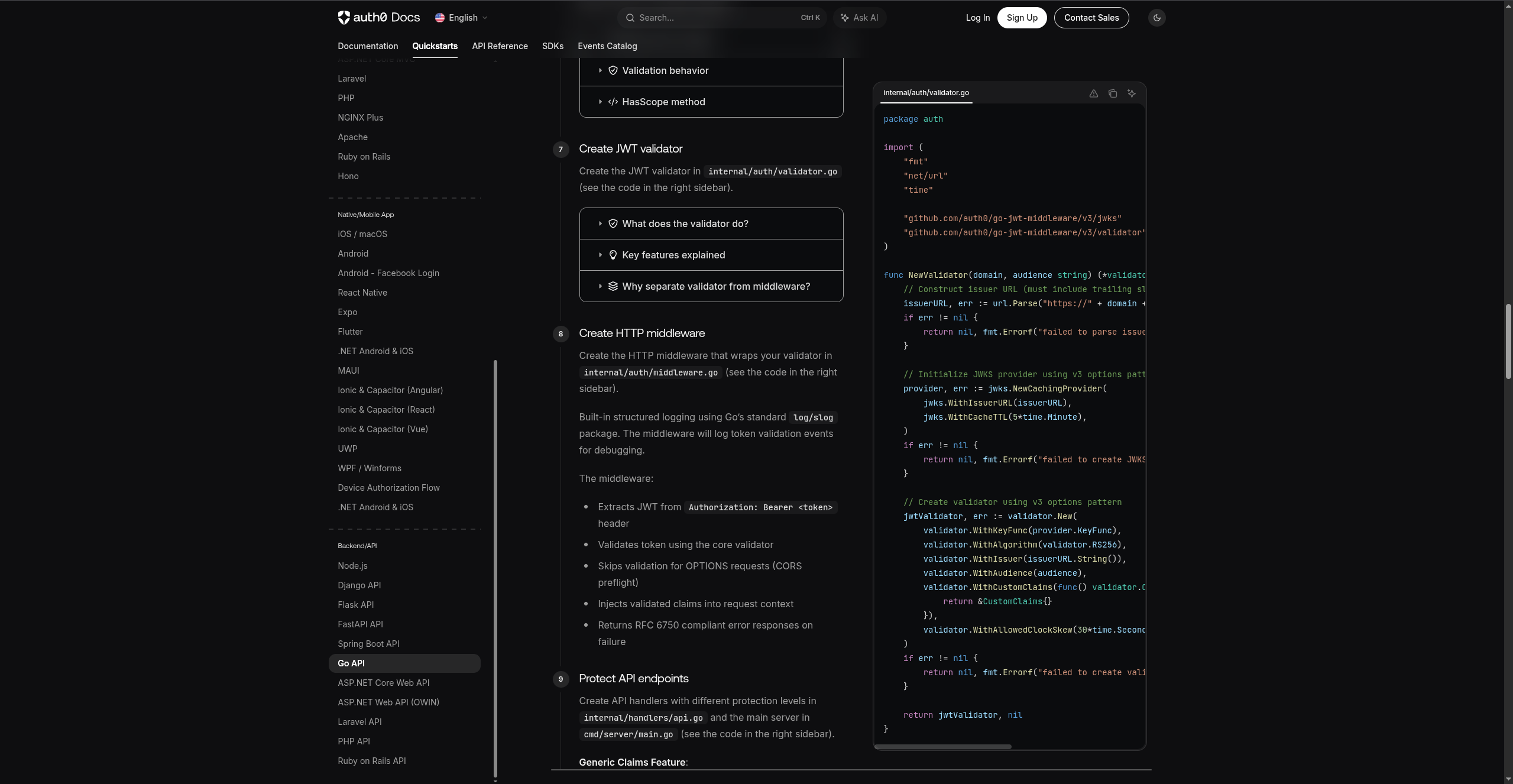
In addition, the docs are all over the place. There’s no clear style, some languages are better documented than others, sometimes clicking things on the page doesn’t actually work (smells vibe coded). There are old articles in their blog that do things in different ways, which seem probably outdated because they don’t match the current layout, but are still the only search result from Auth0 themselves.
Again, it’s not just me. One of the main complaints I saw while trying to determine if I was the idiot in the equation was poor documentation in general and various things working in strange ways that were either poorly documented, or completely undocumented.
Please, Auth0! The skeletons are still marching down the hallway, and I’m all out of mana! WHAT POTION DO I DRINK?
Honorable Mention: Blogs, Including Most Medium Articles
Found here: all over the internet!
This is a common issue. If you are writing a how-to post STOP making your code snippets the only 3 lines you’re talking about. Especially if it’s newly added code. Doubly especially if the new code block that you’re telling me to add doesn’t immediately follow the last code block. And while you’re at it stop making the lines four times longer than the code block is wide.
Code often requires the context of the other stuff around it. Give me that context! It is often helpful if the code block includes comments or something to indicate what’s new in the block. You can omit that from the repo that you definitely linked (you definitely linked a repo… right?) You can omit it from the final result, but I’m probably not even going to read the rest of your article and click the repo if your tiny little snippets that are all out of order confuse me.
If you want to be helpful to people, then be helpful! Make the mana potion the same color as the bar!
4. Oh God, What Do?
Well, you can do whatever you want. I’m going to try and keep these things in mind. It’s really hard to put yourself in the mindset of someone who knows nothing about your thing after you’ve spent a buttload of hours creating it. It’s worth trying. And it’s worth paying attention to people pleading for clarity in your issues list.
I filed an issue for the Auth0 docs, even though I won’t be using them. BubleTea already has an issue for the exact question I had, so I gave it a thumbs up. The JWT library…. TODO. If someone makes an entire plugin to do a common task you should pretty much be aware that you have a usability issue. I also need to put some testing around my implementation to make sure that I’m doing things correctly and can write a good bug report.
I have projects, and parts of projects, that are targeting various audiences. I’m going to keep aiming for the greatest level of “easy to do the right thing” that I can deliver. And I have so many docs to write, in a way that helps people to help themselves (and me).
I’m going to get this wrong at least some of the time. I’m OK with that. I have to be. I hope people will file me some issues to help expose the things I thought were obvious so that I can make them so.
And I’m going to start collecting some examples of things that I consider to be bad UI/UX in GUI applications for another post. There’s a lot out there to learn from.
Devs and users both need a good experience. I’m going to try and make it easy to drink the potion. Those skeletons aren’t going to stop themselves, and there’s loot in this old castle!
Spoiler: You might actually want this, or else when you inevitably screw up you’ll be stuck in the frozen TUI and need to go kill the process. ↩︎
After multiple sessions of hacking around and finding out I did come across an official tutorial on YouTube. The link was ON REDDIT. Not linked on the page where someone new to the library would see them. It was also a super rushed feeling overview, not a true tutorial. There may be more on there, I’ll have to look next time I feel like messing with it. ↩︎